This tab page deals with how DLL/BPL files are handled in the SBOM.
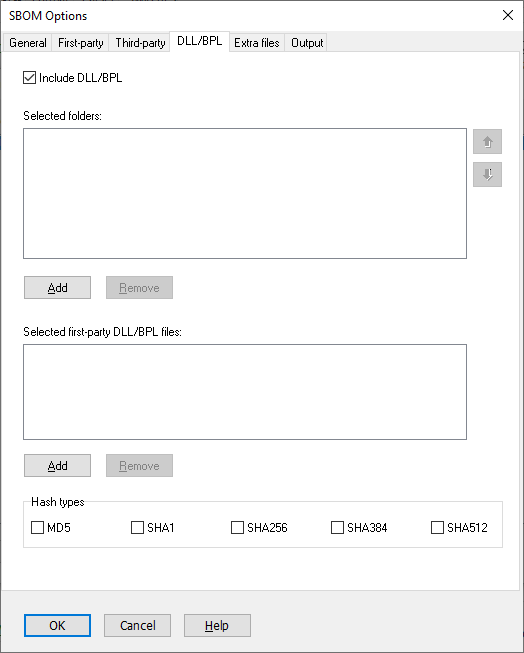
Include DLL/BPL
Default: yes
Normally you should select this option. It will add DLL/BPL files to your components. Only deselect it for testing purposes.
Selected folders
When a reference to a DLL/BPL is found in code, Pascal Analyzer will try to locate the file and read its resource information for version number, copyright etc.
Automatically all folders with found files will be searched for referenced DLLs, and also the folder where Pascal Analyzer is located. Also, it will search the Windows system folder and folders that are included with the PATH environment variable. Select additional folders that also will be searched.
Up/Down
Move selected folder up/down. This decides in which order the folders will be searched.
Add
Add a folder to the list.
Remove
Remove a folder from the list.
Selected first-party DLL/BPL files
If you use DLLs in your product, but regard these as first-party components (instead of external third-party components), select them here.
Add
Press this button to select a DLL/BPL file that should be regarded as a first-party component.
Remove
Press this button to remove a DLL/BPL file from the list.
Hash Types
Default: None selected
Hash values can be automatically inserted for DLL/BPL-files. Pascal Analyzer will load the file into memory, and compute the hash values. You can use hash values to verify that a certain version of the file is used.
Select which of the hashes that shall be included:
MD5
SHA1
SHA256
SHA384
SHA512
CycloneDX supports even more hash types, like SHA3 and Blake. We plan to add these in a future update.
See also:
